Where compression hides in a song
Why do you hear MP3 on a cymbal, but not on a thick bass line? The codec does not spoil the song in an even layer. It throws away whatever it reckons you would miss anyway, because something louder is playing right next to it.
Loud sound covers the quiet part
Take a passage where the kick and the guitar already fill the space. Neighbouring sounds cover each other before any compression. There is almost nothing to throw away, and the MP3 sounds whole. There is nothing to catch, and you really do not hear the difference.
After the hit it flips. The cymbal has gone quiet, but the ring is still hanging in the air. It is quiet and long, and nothing covers it. That is where the codec saves bits: the decay turns into a hiss or a metallic film. The same thing happens to a breath before a phrase and to fingers on a string. A low bitrate has nowhere to put those details, so it ruins them.
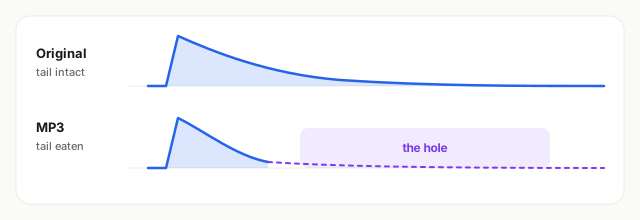
While the sound is loud, the losses stay hidden. Once only the tail is left, there is nothing left to hide them behind.
One bitrate, two different jobs
One person listened to the drop. Another listened to the hi-hat. Both can be right. The bitrate is the same, the places in the song are not. A musician often hears the difference sooner, and not because their ears are better. They simply skip the bass and go straight to the tail.
On a song you know, it is easier: you remember how that ring should sound, and you hear at once that it is wrong. On an unfamiliar track the same hole is easy to miss. Sound also slips out of your head: after about ten seconds you no longer remember how the previous bit sounded. So compare one moment, the hit and what is left after it. You will not hold the whole song in your head.
If you want a number and not an impression, hide the filename and leave only the sound. The rounds are explained in the FLAC vs MP3 article. You can find your own threshold on the headphones you already use, on the setup page.